brand
the mark#
Two hexagons sharing one edge: the left in the text colour, the right in lime. Two shapes that are the same shape, joined, which is what the name means.
isomer.finance
Downloads, all svg:
- the mark, for dark backgrounds
- the mark in one colour, dark and light, where colour isn't available
- the favicon
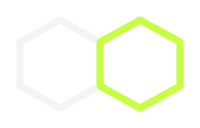
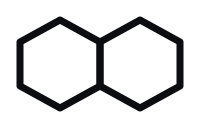


On light backgrounds the left hexagon is #0B0D10; the lime one stays lime.
the wordmark#
isomer in IBM Plex Sans 600, letter-spacing −0.035em, always lowercase. Where the domain matters, .finance follows in Geist Mono, small, in the accent colour.
colours#
| name | dark | light | use |
|---|---|---|---|
| ground | #0B0D10 | #F4F5F7 | the page |
| surface | #12151A | #FFFFFF | cards, tables, inputs |
| hairline | #1C2128 | #E3E6EA | 1px borders |
| text | #F2F4F7 | #0B0D10 | body and headings |
| muted | #8B949E | #5B6470 | secondary text |
| accent | #C6FF3D | #C6FF3D | fills only: the primary action, live dots, the lime hexagon |
| accent ink | #C6FF3D | #4F7A00 | accent text and strokes; lime fails contrast on white |
| danger | #F2837B | #B42318 | errors |
| warning | #E3C35A | #8A6100 | warnings |
Every text colour passes 4.5:1 on both the ground and surface of its theme.
fonts#
- IBM Plex Sans 500 and 600: the wordmark and headings.
- Manrope 400, 500 and 600: body text and interface.
- Geist Mono 400 and 500: tickers, numbers, addresses and code, always with tabular figures.
All three are self-hosted; the site makes no request to Google at runtime.
don't#
- Redraw the mark, change its proportions or swap its colours around.
- Add gradients, glows, drop shadows or glass effects to it.
- Use the dark-background mark on a light background. Its left hexagon disappears; switch to
#0B0D10as above. - Capitalise the wordmark, or set it in another typeface.
- Use the accent for large areas. It's for the one thing on screen you should look at.